An example of a
Microsoft Windows NTâ Installation for a 50
User Environment
Introduction
This article discusses the steps required to
install a windows NT environment into a new 50 user organisation.
The requirements:
- 1 x NT server is to act as the main data
server for the user community, thus allowing a PC centric organisation to
regain control of the data stored by the users.
- 1 x NT server to act as the main mail and
GroupWare server. This must allow for secure e-mail transfer to and from the
Internet.
- Virus protection to be installed on both the
servers and the workstations.
The products:
Main File Server
- Compaq Proliant 1600 Single Pentium II @
400Mhz, 256MB RAM, Compaq 12-24 Gb DDS Drive
- RAID Controller with 5 x 9 GByte Hard
Disks
- RAID Format – 4 x 9 GB HDDs in a RAID 5
arrangement + 1 Hot Standby HDD
The GroupWare Server
Dell Server Single Pentium II 233Mhz, 128MB
RAM, HP Surestore 6000, SCSI Controller, 2 x 4Gbyte Hard Disks
Software
- Microsoft Windows NT Server 4.0
- Microsoft Exchange 5.5
- MimeSweeper
- Veritas Backup Exec
- Network Associates Total Virus Defence
Client Workstation Configurations
The majority of the workstations operated
Windows 95 and Windows NT. In the past most data stored locally on the
workstation drives and perceived as the individuals property and not that of
the organisation.
Printing Environment
Most printers connected to either printer
servers of PCs acting as printer servers located around the network.
Description of the environment proposed
The main file server will act as:
Other Service issues:
- No DHCP is to be installed
- SNMP is to be installed
- Compaq Insight Manager Agents
- Seagate Backup Exec
- Virus Protection
Volumes and Sizes
| Physical Drive
|
Description
|
Size (GB)
|
| C:
|
System Volume
|
2
|
| D:
|
Personal Home Drives located on this drive
|
10
|
| E:
|
Personal Setting Drives (inc. Mail folders)
|
4
|
F:
|
Departmental Drives
|
5
|
| G:
|
Corporate Drive
|
6
|
| |
|
|
| X:
|
Physical CD-ROM within the server
|
|
Note: All drives are to be
NTFS formatted and no compression is to be applied so that statistics per drive
can be accurately tracked.
The GroupWare server will act as:
Other Service issues:
- No DHCP is to be installed
- SNMP is to be installed
- Microsoft Exchange 5.5
- Seagate Backup Exec
- Content Technologies' MimeSweeper
- Virus Software
Figure 1 Proposed NT Environment
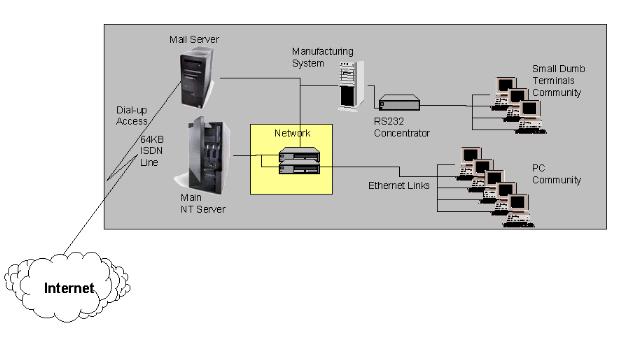
Outline of Tasks to be done.
- File Server Physical Configuration
- Install Operating System
- Install Service Packs
- Install Backup Server Software
- Configure additional services - WINS, SNMP,
LPR, etc.
- Install Virus Protection Software
- File Server Physical Configuration for
Exchange Server
- Install Operating System for Exchange
Server
- Install Service Packs for Exchange
Server
- Install Backup Server Software
- Install Exchange and configure
- Install Exchange Service Packs
- Test Internet Access & Mail
- Install Virus Protection Software
- Install MailSweeper
- Test MailSweeper
- Configure User profiles, Group profiles and
directory structures
- Create Groups
- Create Users and associated directories
- Install Initial Printers
- Final Test
|

